Quick Start
Generate a coverage report using the Swagger Petstore API.
Installation
curl -sL https://cli.tracecov.sh/install/ | sh
uv pip install tracecov requests
Requires Node.js 18 or later.
npm install @tracecov/core
Connect to Your API
Record two requests to the Petstore API and generate a report:
Save the traffic as traffic.json:
{
  "interactions": [
    {
      "request": {
        "method": "POST",
        "url": "https://petstore3.swagger.io/api/v3/pet",
        "headers": {"Content-Type": "application/json"},
        "body": "{\"id\": 123456, \"name\": \"fluffy\", \"photoUrls\": [], \"tags\": [{\"id\": 1, \"name\": \"cute\"}], \"status\": \"available\"}"
      },
      "response": {
        "status_code": 200,
        "headers": {"Content-Type": "application/json"},
        "body": "{\"id\": 123456, \"name\": \"fluffy\", \"photoUrls\": [], \"tags\": [{\"id\": 1, \"name\": \"cute\"}], \"status\": \"available\"}"
      }
    },
    {
      "request": {
        "method": "GET",
        "url": "https://petstore3.swagger.io/api/v3/pet/123456",
        "headers": {}
      },
      "response": {
        "status_code": 200,
        "headers": {"Content-Type": "application/json"},
        "body": "{\"id\": 123456, \"name\": \"fluffy\", \"photoUrls\": [], \"tags\": [{\"id\": 1, \"name\": \"cute\"}], \"status\": \"available\"}"
      }
    }
  ]
}
request.headers and response.status_code are required.
Generate the report:
tracecov report https://petstore3.swagger.io/api/v3/openapi.json traffic.json
TraceCov v0.24.2
Report saved to: coverage.html

  Operations           2/19   (11%)
  Parameters           0/34   (0%)
  Keywords             0/290  (0%)
  Examples             0/93   (0%)
  Responses            2/64   (3%)
  Response Keywords   32/406  (8%)
Save as quickstart.py:
import requests
import tracecov

# Download the OpenAPI specification
schema = requests.get("https://petstore3.swagger.io/api/v3/openapi.json").json()

# Create a coverage tracker
coverage = tracecov.CoverageMap.from_dict(schema)

# Set up a tracked session
session = coverage.requests.track_session(requests.Session())

# Make API requests
fluffy = {
    "id": 123456,
    "name": "fluffy",
    "photoUrls": [],
    "tags": [{"id": 1, "name": "cute"}],
    "status": "available",
}
session.post("https://petstore3.swagger.io/api/v3/pet", json=fluffy)
session.get("https://petstore3.swagger.io/api/v3/pet/123456")

# Generate a coverage report
coverage.save_report(output_file="coverage.html")

operations = coverage.statistic()["operations"]
print(f"Operations: {operations['seen']}/{operations['total']}")
Run it:
python quickstart.py
Operations: 2/19
Save as quickstart.mjs:
import { CoverageMap } from '@tracecov/core';

const coverage = await CoverageMap.fromUrl('https://petstore3.swagger.io/api/v3/openapi.json');

async function send(method, url, payload) {
  const headers = payload === undefined ? {} : { 'Content-Type': 'application/json' };
  const body = payload === undefined ? undefined : JSON.stringify(payload);
  const start = Date.now();
  const res = await fetch(url, { method, headers, body });
  coverage.record(
    { method, url, headers, body: body === undefined ? undefined : Buffer.from(body) },
    {
      statusCode: res.status,
      elapsed: (Date.now() - start) / 1000,
      headers: Object.fromEntries(res.headers),
      body: Buffer.from(await res.arrayBuffer()),
    },
  );
}

const fluffy = {
  id: 123456,
  name: 'fluffy',
  photoUrls: [],
  tags: [{ id: 1, name: 'cute' }],
  status: 'available',
};
await send('POST', 'https://petstore3.swagger.io/api/v3/pet', fluffy);
await send('GET', 'https://petstore3.swagger.io/api/v3/pet/123456');

coverage.saveHtmlReport({ outputFile: 'coverage.html' });

const { operations } = coverage.statistic();
console.log(`Operations: ${operations.seen}/${operations.total}`);
Run it:
node quickstart.mjs
Operations: 2/19
For automatic capture, use @tracecov/axios (instrumentAxios(client, coverage)) or @tracecov/fetch (instrumentFetch(coverage)); they record every call without a per-request record(). See the integration guide.
View the Report
Open coverage.html in your browser:
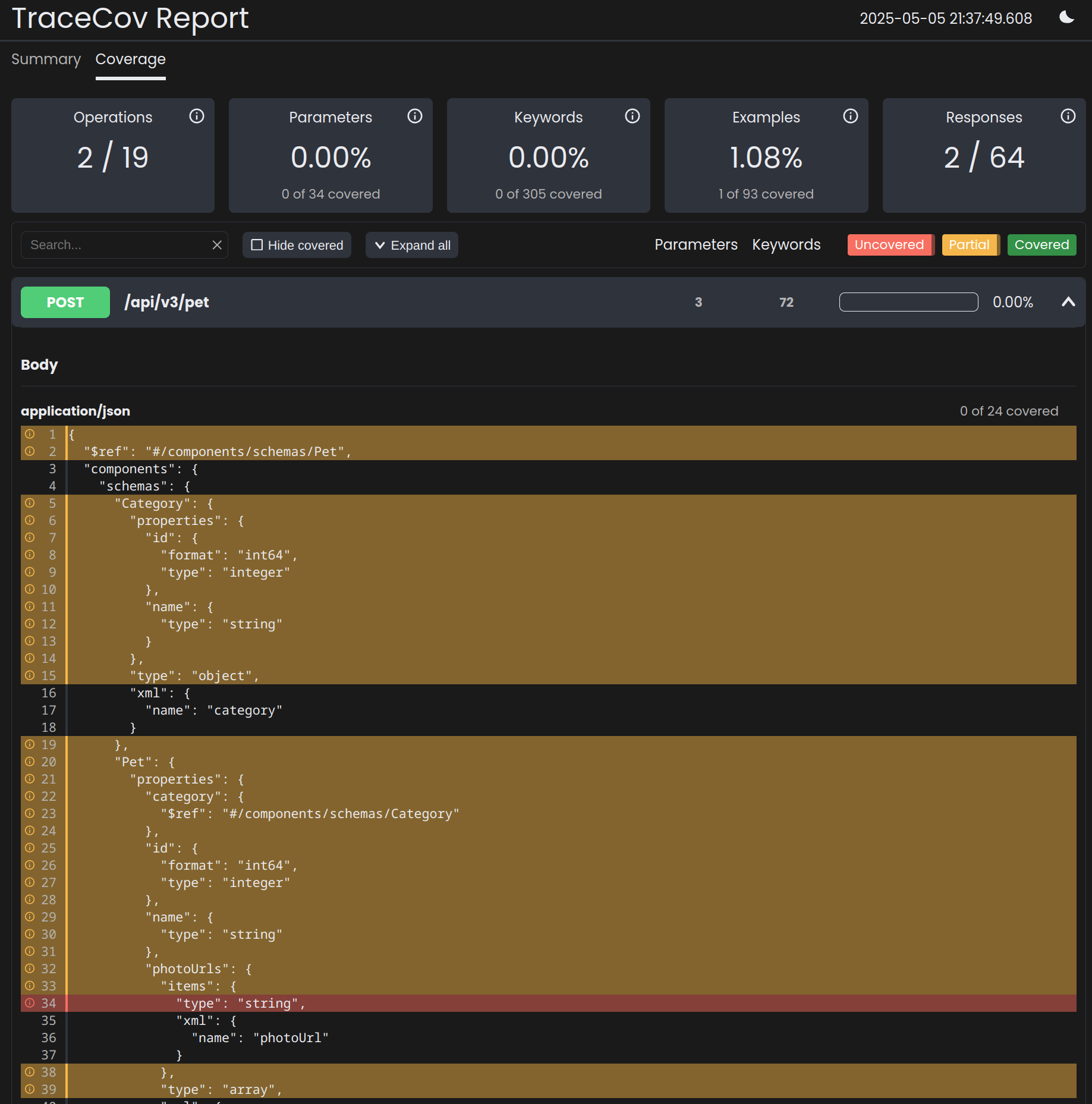
The report shows coverage at multiple levels:
| Color | Meaning |
|---|---|
| 🟢 Green | Fully covered |
| 🟡 Yellow | Partially covered (valid inputs tested, but not invalid) |
| 🔴 Red | Not covered |
Expand any operation to see which parameters and JSON Schema keywords have been tested.
Next Steps
- Integration guides - Connect to your test suite
- Coverage concepts - Understand how coverage is calculated